
ADP
Bringing greater clarity and control to the payroll process.
Scope: Help payroll professionals identify and resolve payroll issues earlier in the pay cycle.
My role: Senior UX/UI Designer; contributed to research, interaction design, prototyping, usability, accessibility, and documentation.
Partners: Product stakeholders, Engineering, QA, and business partners.
Deliverables: Flows, interface concepts, high-fidelity prototypes, and design documentation.
Focus: A live, interactive payroll-register concept with continuous issue visibility and payroll preview.

The Job
At ADP, I worked on enterprise HR and payroll experiences designed to make complex administrative workflows more efficient, understandable, and easier to manage.
My focus was on improving how payroll professionals interact with critical information throughout the pay cycle—from identifying issues to reviewing employee earnings and validating payroll results.
The work combined user research, interaction design, prototyping, usability, accessibility, and close collaboration with Product, Engineering, QA, and business stakeholders.

The Overview
What if payroll professionals could see problems before payroll became a problem?
Traditional payroll workflows can make validation feel unnecessarily late.
Errors may surface only after significant processing has already taken place, while important payroll information can remain difficult to evaluate until later in the pay cycle.
The Progressive Payroll experience was designed to change that model.
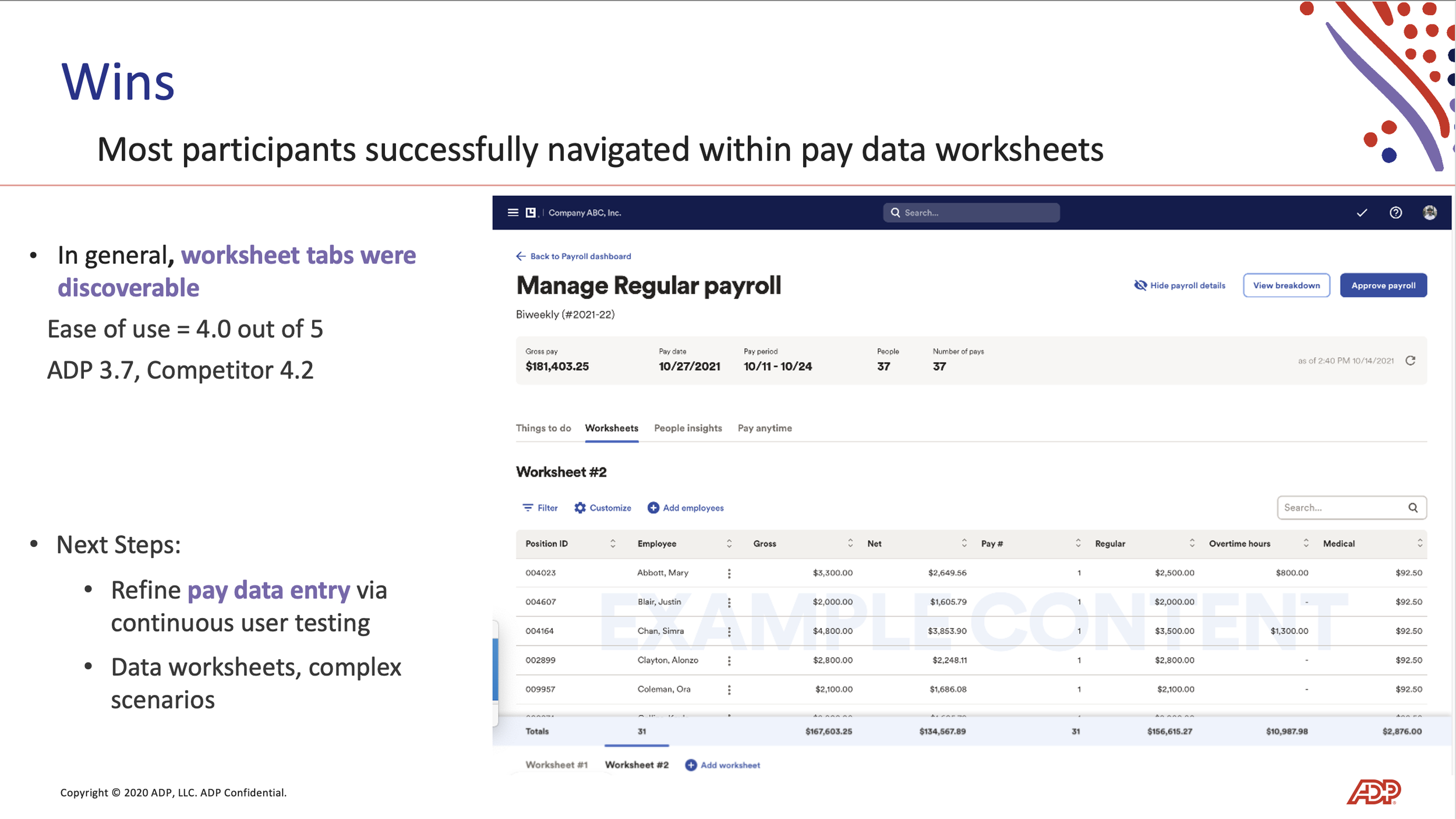
Instead of treating payroll as a process that moves from one static checkpoint to another, the concept introduced a live, interactive payroll register that continuously surfaced critical issues and provided an up-to-date view of employee earnings.
Progressive Payroll
A live payroll register designed to give payroll professionals a clearer view of what was happening throughout the pay cycle.
Identify
Surface critical payroll errors continuously.
Preview
See expected net-pay results in real time.
Resolve
Address issues earlier, before they become larger processing hurdles.
Validate
Reduce the manual effort involved in reviewing payroll results.

The Needs
Make payroll easier to monitor, understand, and correct.
The experience needed to address several problems within an inherently complex workflow.
See issues earlier
Give payroll professionals continuous visibility into errors instead of forcing them to wait until a later point in the process.
Reduce unnecessary effort
Minimize repetitive, manual validation work that could slow payroll teams down.
Make information actionable
Present payroll data in a way that helped users quickly understand what required attention and what could move forward.
Increase confidence
Provide a clearer picture of expected payroll outcomes throughout the pay cycle.
Work within enterprise realities
Create an experience that balanced usability with accessibility, technical feasibility, compliance, and the needs of a large-scale HR and payroll platform.

The Challenge
Payroll is high stakes. The interface needs to make the right information obvious.
Payroll professionals work within tight timelines and have little tolerance for ambiguity.
A small issue can create additional investigation, delay processing, or require support intervention.
The design challenge was to reduce that friction without adding another layer of complexity to an already sophisticated system.
The opportunity was to rethink the experience around continuous visibility rather than end-of-cycle validation.
Instead of asking users to discover what went wrong later, the interface could help them recognize and address problems while there was still time to act.


The Approach
Design around the work—not just the screens.
Because payroll is deeply process-driven, the design needed to begin with an understanding of how people actually manage the pay cycle.
I worked within an Agile team structure, collaborating closely with product stakeholders, developers, QA, and other partners throughout the process.
01 — Define
I began by understanding the existing workflow, the key user pain points, and the business priorities surrounding payroll processing.
This helped clarify where friction was being introduced and where the product could provide greater visibility and control.
02 — Explore
I translated those findings into flows, interface concepts, and high-fidelity prototypes.
The focus was on determining how information should be organized, what needed to remain visible, and how users could move naturally between identifying an issue and resolving it.
03 — Evaluate
Prototypes created an opportunity to review the experience with stakeholders and test assumptions through usability-focused feedback.
Iteration helped refine the interaction model while keeping the experience aligned with technical and operational realities.
04 — Refine
I brought interaction patterns, visual hierarchy, accessibility, and enterprise constraints into the proposed payroll experience.
Design documentation also helped capture established flows and patterns so the work could be understood and extended by the broader team.
The Research
Start with the people responsible for getting payroll right.
Research centered on HR professionals and payroll users—the people closest to the process and most familiar with its friction points.
Through interviews, surveys, and usability testing, I worked to understand where users experienced difficulty, what information they needed most, and which parts of the existing workflow consumed unnecessary time or effort.

From feedback to opportunity
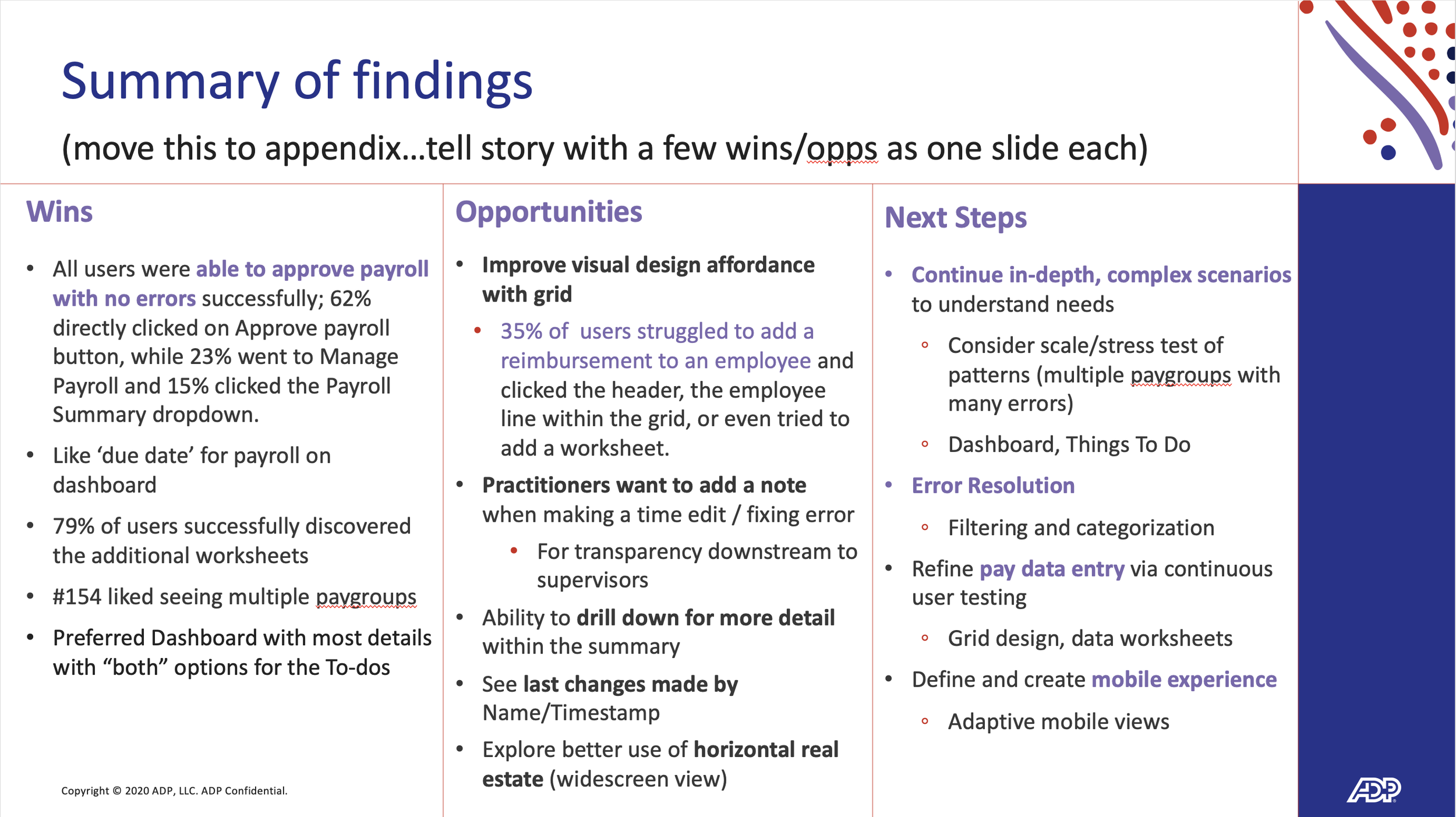
The research helped identify recurring issues around error identification, validation, waiting for information, and the manual effort required to confirm payroll results.
Rather than treating these as isolated usability problems, the findings pointed toward a broader opportunity:
Give users more information sooner, and make that information easier to act on.
The Refinement
Turn a complex process into a clearer working environment.
The Progressive Payroll experience brought multiple pieces of payroll information together into a more immediate and actionable interface.
I focused on creating clear relationships between payroll status, errors, employee earnings, and the actions users needed to take.
Designing for attention
Payroll users do not need every piece of information competing for attention at once.
The interface was structured to help distinguish what was critical, what required action, and what could simply be monitored.
Information hierarchy became an important part of the solution—allowing users to quickly scan the experience while still accessing deeper detail when needed.
Designing for accessibility
Accessibility was considered throughout the design process rather than treated as a final compliance exercise.
The goal was to ensure that critical payroll information, interactions, and system feedback remained understandable and usable for a broad range of users.

The Result
A more proactive approach to payroll management.
The Progressive Payroll concept introduced a more immediate way for payroll professionals to monitor, review, and respond to payroll activity throughout the pay cycle.
The experience was designed to make payroll issues easier to find, reduce manual validation work, and clarify expected payroll outcomes.
Key benefits
Continuous error visibility
Critical issues could be identified earlier in the process.
Real-time payroll preview
Users could review expected net-pay results without waiting until the end of the pay period.
Less manual validation
The experience reduced reliance on repetitive, time-intensive checking.
Greater operational confidence
A clearer view of payroll status helped users understand what needed attention and what was ready to move forward.


The Conclusion
Make complex enterprise workflows feel more manageable.
The ADP work reinforced the value of designing around the realities of the people doing the work.
For a payroll professional, efficiency is not simply about moving faster. It is about having the right information at the right moment, knowing what needs attention, and being able to act without unnecessary friction.
My role was to bring that perspective into the design process—from research and workflow definition through prototyping, refinement, accessibility, and cross-functional collaboration.
The best enterprise experiences don't hide complexity. They give people better ways to manage it.